Showing posts with label windows. Show all posts

Windows : Install Gradle Batch Script(*.BAT)

  1. c:
  2. cd c:\
  3. mkdir gradle
  4. cd gradle
  5. wget --no-check-certificate https://services.gradle.org/distributions/gradle-2.14-all.zip
  6. unzip gradle-2.14-all.zip
  7. rm -f gradle-2.14-all.zip
  8. cd gradle-2.14
  9. cd bin
  10. setx PATH "%PATH%;%cd%"
  11. refreshenv
  12. gradle --version

Please make sure you have installed choletey and GNU unix-utils for Windows and go theough this article if you dont have any of above commands preinstalled :

Batch(*.bat) Script : Install Spring-Boot CLI on Windows 7

  1. mkdir C:\spring
  2. cd C:\spring
  3. C:
  4. wget --no-check-certificate http://repo.spring.io/release/org/springframework/boot/spring-boot-cli/1.1.4.RELEASE/spring-boot-cli-1.1.4.RELEASE-bin.zip

    REM "Latest version = 2.7.3.RELEASE . So, url http://repo.spring.io/release/org/springframework/boot/spring-boot-cli/2.7.3/spring-boot-cli-2.7.3-bin.zip should work."
  5. unzip spring-boot-cli-1.1.4.RELEASE-bin
  6. rm -f spring-boot-cli-1.1.4.RELEASE-bin.zip
  7. cd spring-1.1.4.RELEASE
  8. setx SPRING_HOME "%cd%"
  9. refreshenv
  10. cd bin
  11. setx PATH "%PATH%;%cd%"
  12. refreshenv
  13. spring --version

Please make sure you have installed choletey and GNU unix-utils for Windows and go theough this article if you dont have any of above commands preinstalled :

Getting started with Python, Web Scraping, MS SQL Server, Windows with a web crawler

For getting started install python 2.7 on win7 with this *.bat script here:
http://mohiplanet.blogspot.com/2015/12/install-python-on-windows-7-scriptbat.html

Download SQL Server 2005 :
https://www.microsoft.com/en-us/download/details.aspx?id=21844
SQL Server 2005 Management Studio :
www.microsoft.com/en-us/download/details.aspx?id=8961
If you are  used to with terminal you can rather install command line client rather than visual management studio:
https://www.microsoft.com/en-us/download/details.aspx?id=36433

Make sure you have enabled Administrator mode.

After installation has completed checkout the commandline tool:

  1. sqlcmd -S .\SQLEXPRESS
  2. create some_db
  3. go
  4. use some_db
  5. go
  6. select * from some_table
  7. go
Scraping FEC(Federal Election Commission) Filings (Getting started with a simple crawler) :
Download a sample scraper which downloads all Federal Election Commission electronic filings:
  1. git clone https://github.com/cschnaars/FEC-Scraper/
  2. cd FEC-Scraper
Load FEC sql database into sql server through script:
  1. sqlcmd -S .\SQLEXPRESS
  2. create database FEC
  3. go
  4. exit
  5. sqlcmd -S .\SQLEXPRESS -i FECScraper.sql
  6. go

Setup connection string in both of  FECScraper.py and FECParser.py as follows:
  1. connstr = 'DRIVER={SQL Server};SERVER=.\SQLEXPRESS;DATABASE=FEC;UID=;PWD=;'


create the following directories for convenience of the crawler:
  1. mkdir C:\Data\
  2. mkdir C:\Data\Python
  3. mkdir C:\Data\Python\FEC
  4. mkdir C:\Data\Python\FEC\Import
  5. mkdir C:\Data\Python\FEC\Review
  6. mkdir C:\Data\Python\FEC\Processed
  7. mkdir C:\Data\Python\FEC\Output

In case you can't find any data filings:
Check out this working code:
https://drive.google.com/file/d/0B5hTtesq_tWdZFo3eThQRzY3aEU/view?usp=sharing
as last time I had to change one CSS Query from "Form F3" to"F3" in FECScraper.py

Check a sample commitee for downloading specific filings:
Add one committe id
commidappend.txt content:
  1. echo C00494393 > commidappend.txt


--------------------------------------------------------------------------------------------------------------
Doing more on scraping FEC filings :
The latest FEC scraper supports all FEC filings from v1 to v8.1  : 
it has 8.1 filing version support:
  1. git clone https://github.com/cschnaars/FEC-Scraper-Toolbox
  2. cd FEC-Scraper-Toolbox
  3. :: make sure you create following directories
  4. mkdir C:\Data\FEC\Master
  5. mkdir C:\Data\FEC\Master\Archive
  6. mkdir C:\Data\FEC\Reports\ErrorLogs
  7. mkdir C:\Data\FEC\Reports\Hold
  8. mkdir C:\Data\FEC\Reports\Output
  9. mkdir C:\Data\FEC\Reports\Processed
  10. mkdir C:\Data\FEC\Reports\Review
  11. mkdir C:\Data\FEC\Reports\Import
  12. mkdir C:\Data\FEC\Archives\Processed
  13. mkdir C:\Data\FEC\Archives\Import
  14. :: run the update_master_files.py which download all committees lists along with
  15. :: tons of other info.
  16. python update_master_files.py
  17. :: run this for downloading daily filings
  18. python download_reports.py
  19. :: run this for parsing and mapping the filing data into database
  20. python parse_reports.py
  21. :: make sure to running the db sql script first
  22. :: https://drive.google.com/file/d/0B5hTtesq_tWdYUVRSzNCcHlJYjA/view?usp=sharing
  23. :: and Import directory has *.fec files and not downloaded *.zip files
Please see this if you dont find any of this commands above not installed :
http://mohiplanet.blogspot.com/2015/10/convert-windows-command-prompt-to-linux.html

References:
https://s3.amazonaws.com/NICAR2015/FEC/MiningFECData.pdf

Install Python on Windows 7 Script(*.bat)

  1. ::download python
  2. wget --no-check-certificate https://www.python.org/ftp/python/2.7.3/python-2.7.3.msi
  3. ::run installer
  4. python-2.7.3.msi
  5. ::download and run pip
  6. wget --no-check-certificate https://bootstrap.pypa.io/get-pip.py
  7. C:\Python27\python.exe get-pip.py
  8. ::add python to path environment variables
  9. setx PATH "%PATH%;C:\Python27"
  10. refreshenv
  11. :: check pip version
  12. python -m pip --version
  13. ::should produce this
  14. ::pip 7.1.2 from C:\Python27\lib\site-packages (python 2.7)
  15. ::run pip module with python and install a simple pyodbc package
  16. python -m pip install pyodbc
Download Script : Install Python 2.7.3 on Windows 7.bat

Please see this if you dont find any of this commands above not installed :
http://mohiplanet.blogspot.com/2015/10/convert-windows-command-prompt-to-linux.html

'pwd' command on windows command prompt(cmd)

On windows command prompt, the command to print current directory  is :cd

Mapping 'pwd' command to 'cd':
Create a pwd.bat file on C:\Windows\System32 directory that have cd inside:

Contents of pwd.bat file :

  1. @echo off
  2. echo %cd%

This should create a pwd.bat at system32 directory. Now running pwd command should print current directory.

First hello world app with Laravel 4 in WindowsXP

In windows XP at first download xampp 1.8.2 from here.
http://downloads.sourceforge.net/project/xampp/XAMPP%20Windows/1.8.2/xampp-win32-1.8.2-5-VC9-installer.exe
And install it.
And then download Composer from  https://getcomposer.org/
https://getcomposer.org/Composer-Setup.exe
(Composer is a dependency manager for PHP.Something like Maven in Java.)
While installing composer select php.exe from xampp installation directory(XAMPP_INSTALL_DIR\php\php.exe) when prompted.
Now navigate to a directory where you want to create your first laravel project(D:\l4)
with Command Prompt.Run the following command to create your first laravel project:

composer create-project laravel/laravel your-first-laravel-project --prefer-dist

This command will download and install a fresh copy of Laravel in a new your-first-laravel-project folder within your current directory.
Next run thecomposer install command in the root of your manually created project directory. This command will download and install the framework's dependencies.

Make sure your current directory contains a file named artisan.
Now run the following command to run your first helloworld app:
php artisan serve

Now browse to http://localhost:8000/
to see the output.You should see a screen saying "You have arrived."

Making Windows Command Prompt more linux like

Here I'm trying to keep a list of mostly used command line tools available under windows .
Below is a list of tools that can be put to use via command prompt and most of unix tools for writing automated scripts on Windows.

Install chocoletey:

chocoletey is a yum and apt-get like CLI tool for install new software on your machine but  for windows. With chocoletey(https://chocolatey.org/) you just type 'choco install jdk' and you will have java installed.
On windows 7 just run this on your command prompt:
  1. @powershell -NoProfile -ExecutionPolicy unrestricted -Command "iex ((new-object net.webclient).DownloadString('https://chocolatey.org/install.ps1'))" && SET PATH=%PATH%;%ALLUSERSPROFILE%\chocolatey\bin

Make sure you have run cmd as administrator (elevated):


Now you have the ultimate command line installer installed. :)
With chocoletey any tool you install just run :

  1. refreshenv

to instantly use in your current command prompt window.

Install git :

While installing git from http://git-scm.com/download/win just select "Use Git and optional Unix tools from the windows command prompt":


This way you will have lots of unix command line tools available in your command prompt.
Make sure to select MINGW32 for using in Git-Bash during installation.

Install GNU core-utils for windows:

Install GNU core utils for windows http://gnuwin32.sourceforge.net/downlinks/coreutils.php
from
http://gnuwin32.sourceforge.net/packages/coreutils.htm

Install ps tools:
https://download.sysinternals.com/files/PSTools.zip
pstools has some usefull CLI tools like psexec & many others
Install gtools:

Install gtools http://www.p-nand-q.com/download/gtools/gtools-current.exe from
https://code.google.com/p/pserv4/

gtools has some usefull CLI tools like pathed & many others ( See http://p-nand-q.com/download/gtools/index.html )

Install Gcal , a tool to print calendar on console & have same functionality as Unix_Cal
( http://gnuwin32.sourceforge.net/downlinks/gcal.php )
Install bc , a command line calculator that lets do floating point calculations on command prompt
(http://gnuwin32.sourceforge.net/downlinks/bc.php)

Still missing 'clear' & 'pwd':

Run this code on your cmd:
  1. echo cls > %WINDIR%\system32\clear.bat
you will have unix clear  on your command prompt.
Download this file from :
https://raw.githubusercontent.com/ahmedmohiduet/Scripts/master/pwd.bat
and place it on your system directory:(C:\WINDOWS\system32).
If you have already installed wget with chocoletey then just run the follwing commands on your command prompt:
  1. cd c:
  2. cd C:\WINDOWS\system32
  3. wget --no-check-certificate https://raw.githubusercontent.com/ahmedmohiduet/Scripts/master/pwd.bat

Download and install UnxUtils from
http://unxutils.sourceforge.net/UnxUtils.zip
It has lotta useful utilities like du.

Download and install http://www.paulsadowski.com/wsh/cmdprogs.htm
http://www.paulsadowski.com/wsh/cmdutils.zip
It has lotta useful tools like df

Download and install Putty Installer from http://www.chiark.greenend.org.uk/~sgtatham/putty/download.html
https://the.earth.li/~sgtatham/putty/latest/x86/putty-0.67-installer.exe
make sure to add environment variable:
  1. setx /m PATH "%PATH%;C:\Program Files (x86)\PuTTY"

It has lotta useful tools like pscp,putty,plink etc

Download and install nmap
https://nmap.org/dist/nmap-7.60-setup.exe
it has lotta network utilities like nmap, npcap, ncat, ndiff, nping

Download and install util-linux-ng
http://downloads.sourceforge.net/gnuwin32/util-linux-ng-2.14.1-setup.exe
it has lotta tools like col, colcrt, colrm, ddate, getopt, hexdump, line, rename, rev, taiff

In Command Prompt you dont get to copy & paste convenient enough. But fortunately in Git-Bash you copy and paste with ctrl+inst and shift+inst.

I am trying maintaining a list of all command-line tools available for windows & trying to make the list as much as comprehensive as possible.
Feel free to add comment if you believe I am missing any more tool :)


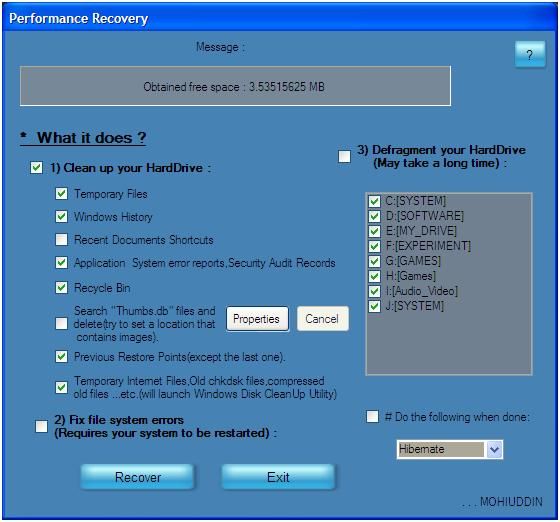
A Cleaner written in VB.NET that runs on Windows XP

A Cleaner written in VB.NET that runs on
Windows XP


This program provides all of the following dirty works to perform in an

automated fashion :

1.Cleaning up each drives

2.Searching and cleaning up thumbs.db files

3.Cleaning up previous restore points (except last one)

4.Fixing file system errors (Requires System Reboot)

5.Defragmenting each drive

6.Queue hibernate or shutdown.

7.Automatically saves progress in the registry and reloads previously saved progress(resumes previous work) after the next time windows starts , in case any kind of system failure , prompting the user a message :


Full working code... Download